Cancelling a Trip Request
You can cancel a trip request in Transportation Manager to stop a trip that is no longer needed, freeing assigned drivers and vehicles immediately.
Admins can cancel individual trips, whether they are awaiting approval, already approved, a round trip and a recurring series. You can also cancel an entire recurring series before it has been approved.
Cancelled trips stay visible for your records but cannot be edited or reactivated.
Cancel an Approved Trip (Single Request)
You can cancel a trip that has already been approved, for example, when plans change after approval.
-
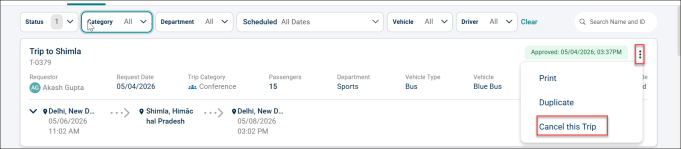
Click the ⋮ icon on the trip you want to cancel.
-
Select Cancel this Trip.
-
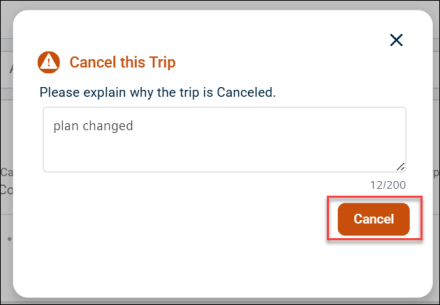
Enter a reason for the cancellation in the pop-up that appears.
-
Click Cancel.
Result: The trip status changes to Cancelled. The previous approval is voided. Any assigned driver and vehicle are released immediately and become available for other trips in that time slot.
Cancel an Entire Recurring Series
You can cancel all trips in a recurring series at once. However, this option is available before the series has been approved.
-
Click the ⋮ icon on the recurring trip series from the Requests tab.
-
Select the Cancel Recurring Series option.

-
Enter the reason for cancelling the series and click Cancel.
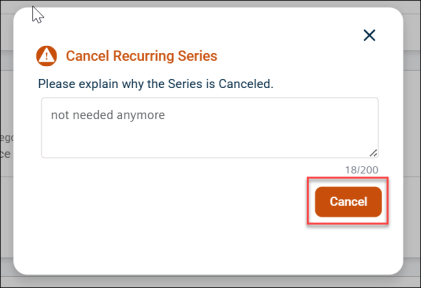
Result: The series is removed from the Requests tab. All occurrences display a status of Cancelled along with the reason in All Trips. All assigned drivers and vehicles are released.

Cancel a Round Trip
Cancelling a round trip is similar to cancelling a simple trip request.
NOTE
- Only Admins can cancel trip requests. Requestors, Approvers (unless they are also an Admin), and Drivers do not see the cancel option.
- Cancellation is permanent — a cancelled trip cannot be reactivated. Submit a new request if the trip is still needed.
- Past or completed trips cannot be cancelled.
